
3.7 KiB
3.7 KiB
Internet Security
Internet Threat Models
- Different to other threat models:
- The attacker isn’t in control of the network
- The attacker hasn’t got access to the target’s OS
Cookies
HTTPis a stateless protocol- Most of what we do online is stateful
- Cookies are small text files used to provide persistence
- Servers can provide cookies during HTTP responses, using
Set-Cookie - Browsers will return any cookies for a given domain in
GETandPOSTrequests

Types of Cookie
- Session - Deleted when the browser exits, contain no expiration date
- Persistent - Expire at a given time
- Secure - Can only be used over
HTTPS HTTPOnly- Inaccessible tojs- Makes it harder to steal
Third Party Cookies
- Cookies are associated with the domains that produced them
amazon.comcookies don’t go togoogle.com
- Some websites include requests to other domains, such as 3rd party advertisers
- These serve cookies a lot
- This is how advertiser companies know what ads you’ve been served and what adverts you’ve clicked on
Cookie Vulnerabilities
- How a website uses a cookie is up to the server
- Many create a
SIDto authenticate users, for example to keep me logged on - Obtaining this cookie - cookie stealing - lets you hijack their session
HTTPCookies can be stolen simply by monitoringHTTPSwill require cross-site scripting attacks or DNS poisoning
Cross-site Scripting (XSS)
- A type of injection attack, similar in many ways to an SQL injection
- HTML is read by a browser and is a combination of content and structure
- If we can inject
htmlstructures into the content of a website, the browser will simply execute these- e.g. a
<script>tag
- e.g. a
Reflected XSS
-
A malicious URL that inserts an exploit directly into the page returned by a server
-
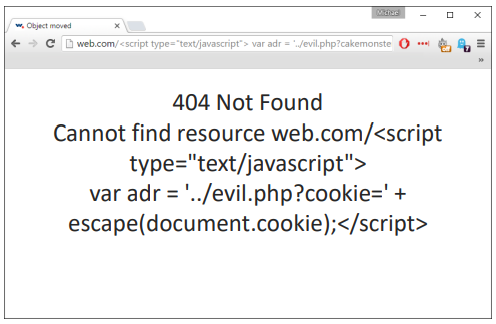
Consider a 404 page at some address
-
If we embed code into the url
-
-
Modern browsers will throw up a warning
-

Persistent XSS
- Even worse, no need to trick people into clicking links
- Any website that doesn’t properly sanitise
htmltags from user input is vulnerable - Blog posts with comment sections are obvious targets
- Forums, web comments, shopping reviews
The Samy Worm
-
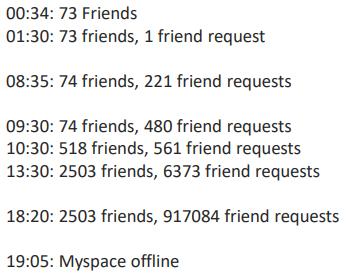
In 2005 Samy Kamkar wrote an XSS-based attack on MySpace
-
-
Fastest spreading virus of all time
-

Preventing XSS
- Websites must aggressively escape HTML characters from any user input / output
- Locate all positions in which a website handles untrusted data
- Escape appropriately depending on type of input
- When you consider all of the things people input on interactive websites, this can be a real problem
- You also need to find all of the bizarre obfuscated versions of XSS
- Use an encoding library, which will handle all of these edge cases
Cross site Request Forgery (XSRF)
- When a user puts in a
HTTPrequest, they will also send any relevant session cookies- e.g. an
SIDfrom having logged in
- e.g. an
- If the user has already authenticated, a malicious URL can then perform some action on their account
http://shop.com/account.php?act=editemail&e=attacker@mail.com
XSRF in POST
-
Most websites use POST, this is little defence
-
The phishing email just points to a convincing website with a malicious form on it

Preventing XSRF
- XSS vulnerabilities make XSRF a lot easier
- Use synchroniser tokens
- Each website form has a one-time token that the server validates when the form is submitted